

Capturing the Magic: 10 Pro Tips for Cozumel Diving with a GoPro in 2026
The most expensive camera in the world cannot fix bad buoyancy. You might have the brand new GoPro Mission 1 Pro with its massive 1-inch sensor, but without the right cozumel diving with a gopro tips, your footage will still come out shaky and blurred. We've all felt that sting of frustration after a dive, only to realize the eagle ray we spotted is just a blue smudge on the screen. It's a common struggle for everyone joining our Dive Hub family, especially when navigating the famous drift currents of the Mesoamerican Barrier Reef.
You deserve to bring home memories as vibrant as the reefs themselves. We're here to help you capture steady, professional video without missing a second of the adventure. You'll learn the exact "set and forget" configurations for the 2026 Mission 1 series and the hands-free techniques that Memo uses to enjoy the 100-foot visibility while the camera does the hard work. We're diving into everything from color correction at depth to the stability secrets that turn beginners into underwater cinematographers.
Key Takeaways
- Unlock the best 4K settings to showcase Cozumel’s stunning 100-foot visibility and vibrant marine life.
- Master essential cozumel diving with a gopro tips to turn your buoyancy into a gimbal for rock-steady footage in drift currents.
- Choose the right mounts and "tray and lights" setups to bring back the true, breathtaking colors of the Mesoamerican Reef.
- Learn the "Tuck and Glide" technique to capture epic, close-up encounters with turtles and eagle rays without disturbing them.
- Discover how diving in small groups with local experts like Memo gives you the perfect environment for underwater cinematography.
Why Cozumel is a GoPro Divers Paradise (and the Challenges)
Cozumel is legendary for a reason. When you drop into the water, you're immediately hit by that incredible 100-foot visibility. It's like flying through liquid crystal. This clarity is why Cozumel's vibrant reef system is a bucket-list destination for every underwater creator. However, that same clarity presents a unique challenge for your camera's sensor. While bulky DSLR rigs struggle with drag in our famous drift currents, the compact GoPro Mission 1 is your best friend. It lets you focus on your buoyancy while capturing high-speed encounters with eagle rays without the bulk. Mastering these cozumel diving with a gopro tips starts with understanding that the environment dictates your settings.
The biggest hurdle for any diver here is the current. Cozumel diving is almost entirely drift diving, which means you're on a constant underwater conveyor belt. For a photographer, this is a double-edged sword. On one hand, you can glide past miles of pristine reef without kicking a fin. On the other, holding a camera steady while moving at two knots is difficult for beginners. If you aren't careful, your footage will look like a shaky handheld home movie. The reward for mastering this movement is unparalleled. You'll get to film vibrant coral swim-throughs and effortless pans of the reef wall that look like they were shot with a professional cinema drone.
The Best Dive Sites for Photography in Cozumel
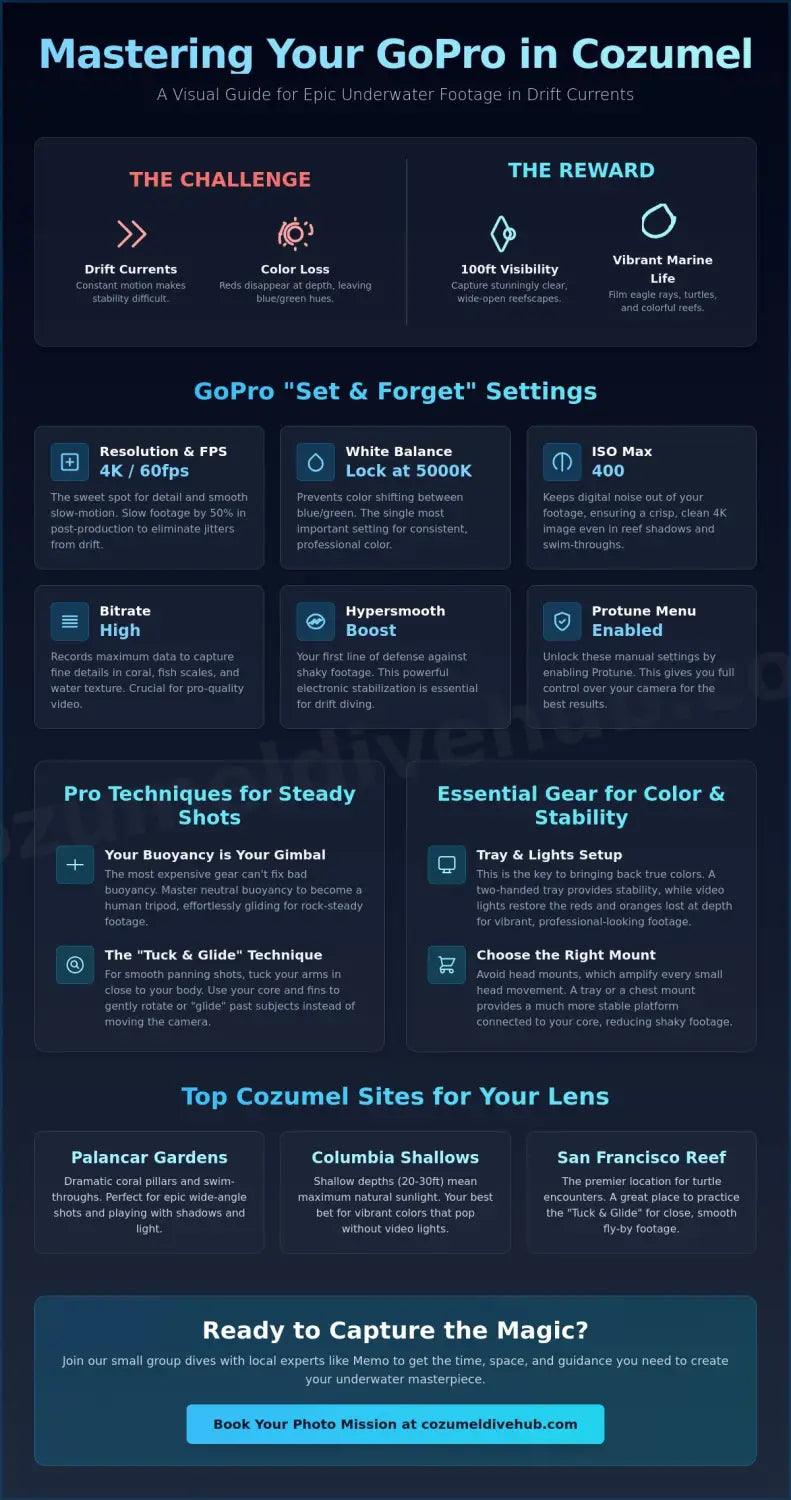
Not all reefs are created equal for your lens. Palancar Gardens offers towering coral pillars that create dramatic shadows and deep blue backgrounds, perfect for wide-angle shots. If you want colors that pop without using external filters, Columbia Shallows is the place to be. Its shallow depth of only 20 to 30 feet allows the sun to do all the work for you. For those wanting slow-motion turtle footage, San Francisco Reef is a reliable spot for close, personal encounters. These locations are where our cozumel diving with a gopro tips really come to life, as each site requires a slightly different approach to framing.
Understanding Light at 60 Feet
Water is a filter that hates the color red. By the time you hit 60 feet, your footage can look washed out and sickly green. To get the best results, aim to dive during the underwater "Golden Hour" between 10:00 AM and 2:00 PM. This is when the sun is directly overhead, penetrating the deepest into the Mesoamerican Reef. Be careful, though; that 100-foot visibility can actually overexpose your shots if you're filming toward the surface. The high contrast between the dark reef and the bright Caribbean sky can confuse the Mission 1 Pro's auto-exposure, so keeping the sun at your back is essential for balanced colors.
Essential GoPro Settings for Cozumel’s Crystal Clear Water
The 2026 GoPro Mission 1 series is a technical powerhouse, but it's only as good as the instructions you give it. While Cozumel's 100-foot visibility provides a stunning backdrop, the high-contrast environment of the Mexican Caribbean can confuse a camera's automatic brain. 4K resolution at 60fps is the absolute sweet spot for our reefs. This combination captures the intricate textures of the coral while allowing you to slow down your footage by 50 percent in post-production. This is essential for smoothing out the natural jitters that happen when you're flying along the reef in a drift current. Mastering these cozumel diving with a gopro tips will save you hours of frustration when you finally sit down to watch your highlights.
Locking your White Balance is the single most important "pro secret" for consistent video. If you leave it on "Auto," the camera will constantly shift between blue and green hues as you look up toward the sun or down into the shadows of a swim-through. For Cozumel's deep blue water, locking your White Balance at 5000K or 5500K ensures your colors stay stable throughout the entire clip. Additionally, keep your ISO Max set to 400. Even with the new GP3 processor, pushing the ISO higher in the darker sections of Palancar or Columbia will introduce digital noise that ruins the crispness of your 4K image. If you're ready to put these settings to the test, our team can help you find the perfect light on a personalized dive trip tailored to creators.
The 2026 GoPro Settings Cheat Sheet
To get the most out of your Mission 1 Pro, you need to dive into the Protune menu. These specific configurations are designed to handle the unique physics of light in the Caribbean Sea:
- Bitrate: Set to "High" (100Mbps or more) to ensure the camera records enough data to distinguish between the thousands of tiny fish and coral polyps.
- Hypersmooth (Boost): Always keep this on. It's your best defense against the micro-vibrations caused by water movement and current.
- Shutter Speed: Set this to 1/120 when shooting at 60fps. This follows the "180-degree rule," giving your movement a natural, cinematic blur that feels professional.
Color Correction: Red Filters vs. Post-Processing
Even with the best settings, water filters out red light as you go deeper. For shallow sites like Columbia Shallows (20-30 feet), a light "Snorkel" filter is enough to bring back the pinks and oranges of the reef. Once you drop past 50 feet at sites like Palancar Bricks, you'll need a deep red "Dive" filter to prevent your footage from looking entirely blue. If you prefer a clean lens, shooting in the "Flat" color profile allows you to restore those colors later using the GoPro Quik app or professional software. You can find more advanced GoPro underwater photography tips to help you decide if still images or video better suit your storytelling style. Whatever you choose, the goal is to spend less time fiddling with buttons and more time enjoying the mesmerizing beauty of the abyss.
The Best GoPro Mounts for Cozumel’s Famous Drift Dives
Choosing the right mount is just as important as your camera settings. When you're gliding along the Santa Rosa Wall, the current does the work for you, but it also creates drag on your gear. You need a setup that balances stability with mobility. While many beginners reach for a head or mask mount, we strongly discourage them for serious filming in Cozumel. Not only do they make for shaky, dizzying footage every time you check your air, but your regulator bubbles will rise directly in front of the lens. There's nothing more frustrating than having a perfect eagle ray encounter blocked by a wall of silver bubbles. For the best cozumel diving with a gopro tips, we always recommend handheld options that keep the camera away from your exhaust valves.
Safety is our top priority at Cozumel Dive Hub. No matter which mount you choose, always use a high-quality coiled tether. Cozumel's reefs are a protected treasure, and we never want a dropped camera to damage the delicate coral or become a permanent part of the reef. A secure tether ensures that if you need to use both hands to adjust your mask or help a buddy, your GoPro stays right where it belongs. It’s all about peace of mind so you can focus on the mesmerizing beauty around you.
The Handheld Pole: Pros and Cons
A compact handheld pole is a fantastic tool for getting closer to shy marine life without scaring them away. It's the best way to peek into the crevices of the reef to find the endemic Splendid Toadfish. However, there's a catch. The longer the pole, the more you'll experience the "pendulum effect," where every tiny hand movement is magnified into a giant wobble. To keep your footage professional, keep the pole retracted and short. This reduces the leverage the current has on your arm and helps you maintain that smooth, cinematic glide we all love.
The Tray and Dual Handle Setup
If you want the ultimate in stability, the tray and dual handle setup is the gold standard. Holding the camera with two hands naturally steadies your shots and helps you keep your arms tucked in, which is better for your streamlined profile. This setup is also the perfect platform for adding powerful video lights later on to bring back those missing red tones. Mastering a bulky tray while managing your buoyancy is a skill you'll refine during an advanced open water cozumel course. Using a tray forces you to use your lungs for trim and positioning, turning you into a more capable diver and a better underwater filmmaker simultaneously.
How to Shoot Steady Footage While Drifting
In Cozumel, your lungs are your most expensive camera accessory. Think of your buoyancy as a biological gimbal. While the current carries you along the wall, any sudden movement with your fins will send a ripple of vibration through your entire body and straight to your GoPro. The secret to professional-looking video is to stop fighting the water. By achieving perfect neutral buoyancy, you become a stable platform that glides through the abyss. These cozumel diving with a gopro tips focus on the physical "how-to" that separates shaky vacation clips from cinematic masterpieces.
The "Tuck and Glide" technique is our favorite way to film the reef walls. Pull your elbows into your ribs and hold your camera tray or pole close to your chest. This minimizes your profile and prevents the current from catching your arms like sails. Because GoPros use an ultra-wide-angle lens, remember that "closer is always better." Objects underwater appear 33 percent larger and closer than they actually are, but the wide lens can make a turtle ten feet away look like a tiny speck. To get that "wow" factor, you need to be within three to five feet of your subject while maintaining a respectful distance from the coral.
Mastering the Drift
Don't kick to stay still; it creates silt and results in shaky video that's impossible to fix later. Instead, use the current as your natural dolly system for epic "fly-by" shots of the massive sponges at Palancar. Streamline your gear by clipping off any dangling gauges or lights that might vibrate or drag in the flow. By inhaling deeply to rise or exhaling slowly to descend, you can mimic a cinematic crane shot without ever touching a button. Ready to master your trim? Join us for a dive trip and let's capture something epic together!
Interacting with Marine Life
Filming the Cozumel Splendid Toadfish requires a specific approach. These guys hide in dark crevices, so you'll need a steady hand and a low angle to peek into their dens without bumping the reef. When you spot a sea turtle, don't swim directly at it. Stay slightly to the side and let the current carry you past for a natural, unhurried encounter. Following proper scuba diving cozumel etiquette is vital while filming; never chase or touch the animals just to get the shot. Respecting these cozumel diving with a gopro tips ensures the creatures stay relaxed, which actually results in much better footage for your collection.
Join the Cozumel Dive Hub Family for Your Next Photo Mission
Ready to turn these cozumel diving with a gopro tips into actual footage? At Cozumel Dive Hub, we aren't just guides; we're a family of passionate divers born and raised on this island. When you dive with Memo and our local experts, you gain access to decades of knowledge about how the currents move around the Mesoamerican Reef. We know exactly where the eagle rays congregate and which coral heads hide the most vibrant macro life. Your adventure starts here, and we're committed to making sure you bring home the epic shots you've been dreaming of.
One of the biggest advantages of joining our group is our focus on small, personalized teams. We never want you to feel rushed. If you spot a hawksbill turtle and need an extra minute to get your framing right, we've got your back. Our standard 2-tank morning dives, priced at approximately $130 USD in 2026, are structured to give creators the time they need. You won't be fighting a crowd of twenty other divers for the same angle. Instead, you'll have the space to practice your neutral buoyancy and "Tuck and Glide" techniques in pristine, crystal-clear water.
Personalized Service for Photographers
We take gear seriously. Before we even hit the water, we'll brief our Divemasters on your specific filming goals for the day. Whether you're testing the new Mission 1 Pro sensor or perfecting your color correction, we'll help you find the best light. After the dive, your equipment is treated with care. We provide dedicated rinse stations specifically for your camera housings and trays to ensure the salt from the Caribbean Sea doesn't damage your electronics. We also handle the logistics, including the collection of the $225 MXN Cozumel Marine Park fee, so you can stay focused on the magic happening behind the lens.
Ready to Level Up Your Skills?
If you're looking to move beyond the basics, consider a cozumel specialty diving course in Underwater Photography. We'll show you how to navigate the 80 to 100+ foot visibility like a pro. Our local knowledge of the currents helps you position yourself perfectly for that cinematic "fly-by" shot every single time. Don't leave your memories to chance on a crowded boat. Join a community that loves the ocean as much as you do. Book Your Cozumel Dive Adventure With Us Today! Let's make some bubbles together and capture the breathtaking beauty of our island home.
Ready to Capture Your Cozumel Masterpiece?
You now have the settings, the mounts, and the techniques to turn every drift into a cinematic highlight reel. Remember that professional footage starts with your lungs. When you use your buoyancy as a gimbal and lock in those 4K 60fps settings for your Mission 1 camera, the vibrant reefs of the Mexican Caribbean will look stunning on any screen. These cozumel diving with a gopro tips are your ticket to bringing home memories that feel as real as the moment you first dropped into the 100-foot visibility of our abyss. Don't let your epic encounters with eagle rays become just a blurry memory!
Our born and raised local guides, including Memo, are ready to show you the hidden corners of the reef that most divers never see. We keep our groups small and personalized to ensure you have the space and time to get the perfect shot while maintaining top-notch professional safety standards. Your adventure starts here!
Join the Cozumel Dive Hub family for an unforgettable underwater journey! We can't wait to see the incredible footage you'll capture while exploring our island home. Let's make some bubbles together!
Frequently Asked Questions
Do I really need a red filter for my GoPro in Cozumel?
You definitely need a red filter if you plan to dive deeper than 15 feet. While Cozumel's 100-foot visibility is legendary, the water still absorbs red light quickly. A "Dive" filter is essential for the deep walls of Palancar to prevent your footage from looking entirely blue. For shallow sites like Columbia Shallows at 25 feet, a lighter "Snorkel" filter brings back those vibrant reef colors perfectly.
What is the best GoPro mount for a beginner diver?
A short handheld pole is the most reliable choice for someone just starting their underwater journey. It keeps the camera away from your regulator bubbles and allows you to get closer to the reef without risking your safety. Wrist mounts are also popular for hands-free convenience. These options are much better than head mounts, which often lead to dizzying footage in our 2-knot drift currents.
How do I stop my GoPro from fogging up inside the housing?
Anti-fog inserts are the most effective way to prevent moisture from ruining your shots. Place one insert on each side of the camera inside the housing before you board the boat. It's also vital to keep your gear in the shade between dives. Rapid temperature changes from the 86°F Mexican sun to the 80°F water are what trigger condensation inside the lens housing.
Can I take my GoPro on a Discover Scuba Diving course?
We recommend leaving the camera behind for your very first Discover Scuba Diving experience. Your safety and comfort are our top priorities while you learn to breathe underwater. Once you've mastered the basic skills and feel relaxed in the water, you can bring your camera on the second dive. Our instructors want you to focus on the thrill of the ocean before worrying about your settings.
What are the best GoPro settings for a night dive in Cozumel?
Set your frame rate to 24fps or 30fps to allow more light into the sensor during a night dive. You should also increase your ISO Max to 800 or 1600 depending on the strength of your dive light. Because there is no natural sunlight, high-powered video lights are required to see anything on screen. These specific cozumel diving with a gopro tips help you capture the nocturnal creatures of San Francisco Reef.
How do I keep my GoPro steady in strong Cozumel currents?
Neutral buoyancy is your best defense against the 2-knot currents found at sites like Santa Rosa Wall. By holding a two-handed tray close to your chest, you create a stable and streamlined profile. This "Tuck and Glide" method prevents the water from vibrating your camera. It's much more effective than trying to kick against the flow, which only results in shaky video and stirred-up silt.
Is it better to take photos or video with a GoPro underwater?
Video is the preferred choice for capturing the dynamic movement of our famous drift dives. With 4K or 5.3K resolution, you can easily pull high-quality still images from your footage using the GoPro Quik app later. This ensures you never miss a split-second encounter with a passing eagle ray. Taking individual photos can be difficult while moving in a current, so let the video run and edit your favorites later.
Should I use lights for GoPro diving in Cozumel during the day?
Video lights are incredibly helpful for bringing back color in the dark crevices and swim-throughs of the reef. While the sun provides plenty of light in the shallows, it doesn't reach into the deep shadows of Palancar Caves. Using lights helps you reveal the 100 percent natural colors of sponges and hidden macro life. For wide-angle reef shots in 100-foot visibility, the sun is usually sufficient if it stays behind you.